Why You Should Disable The Legacy Paperclip TODAY

One of the biggest vulnerabilities for any organization today is sitting inside people’s email accounts. Email, and the old, legacy paperclip we use for attaching files, are responsible for an estimated 91% of cyberattacks for companies globally, often resulting in debilitating data leaks that can devastate an organization. Incoming attachments via the traditional paperclip leaves you vulnerable to several risks, such as phishing scams and other malicious scripts. We’ve listed the major reasons below your company is at risk if you’re still using the standard paperclip for sending and receiving files. 

Data Leaks & Data Loss

Data leaks and data loss are a bigger risk than you thought. Employees leaking information to unauthorized parties is one of the more commonly known ways for your company data to fall into the wrong hands. But it can be far worse than that. Just look at how Microsoft executives were hacked for months before it was discovered. Bad actors accessed their accounts and were able to spy on the information being transmitted back and forth. If they had used Document GPS their attachments wouldn’t have been so vulnerable since they had an extra layer of protection around them. Here at ShelterZoom we compare it to the security that comes with storing valuable items in safe deposit boxes instead of a secure vault. With a vault as soon as one person breaks in, everything inside is up for grabs. But with safe deposit boxes you have to access each one individually. With our innovative Document GPS solution when you tokenize each file it’s just like putting it inside a safe deposit box where it has its own layer of protection built around it. 

The potential economic and reputational damage from breaches such as these measure in the millions of dollars. If you combine regulatory fines, costs of mitigation, loss of clients (both potential and existing) and the years it takes to recover, one single data breach can devastate an organization. 

Document GPS doesn’t just protect you from data leaks you don’t know are taking place, but it also offers multiple methods for preventing sharing of files you have willingly sent but you don’t want them to be shared outside of authorized recipients. With our solution not only can you control who is allowed to download or share each file, but you can prevent sharing after downloading with our multi-featured Advanced Screenshot Block. 

Ransomware 

Nearly every week there is news of devastating ransomware attacks, often demanding sums in the millions of dollars and rendering the organization unable to continue operations. When it comes to healthcare the ransom amounts are usually much higher and more debilitating. Often these ransomware attacks begin by an employee clicking on a malicious link or opening a file with scripts that run automatically and infiltrate their device. When you use Document GPS you can require any attachments being sent to you come via your Secure Link which is automatically a strong deterrent to bad actors. Besides being a deterrent the virus scan will check for anything suspicious before you can view the file and you can view it in a browser tab first without downloading it so your device is less likely to be compromised. 

Wire Fraud

Multiple industries have been hard hit by wire fraud simply because emails were intercepted or being spied on, often by people within the organization who were just waiting for the right time to pounce. Any information sent using the traditional paperclip is susceptible to being accessed and when escrow or other account information is involved the stakes become much greater. Using Document GPS secures your documents–and can even include encrypted, private messages—so you drastically lower your risk of anyone accessing your files without your permission. Disable your old paperclip today to protect your company and your clients from losing money to scammers just waiting for you to let your guard down.
Email attachments have become so commonplace that we don’t even think about how vulnerable they are to an organization. Data loss is only getting worse and now is the time to protect your company before it is too late. Sign up for Document GPS or book a quick demo with one of our staff to see what you’ve been missing.
How to Disable The Old Paperclip in Google Workspace

Have you replaced your vulnerable attachment paperclip yet? Everyday your organization waits to replace one of the biggest vulnerabilities facing companies today is another day you risk data loss and data breach. Here are the instructions for disabling the use of the old paperclip for emails account within Google Workspace (go here for instructions on how to disable the attachment paperclip in Microsoft 365). Note: These instructions require access to the Admin Console. 

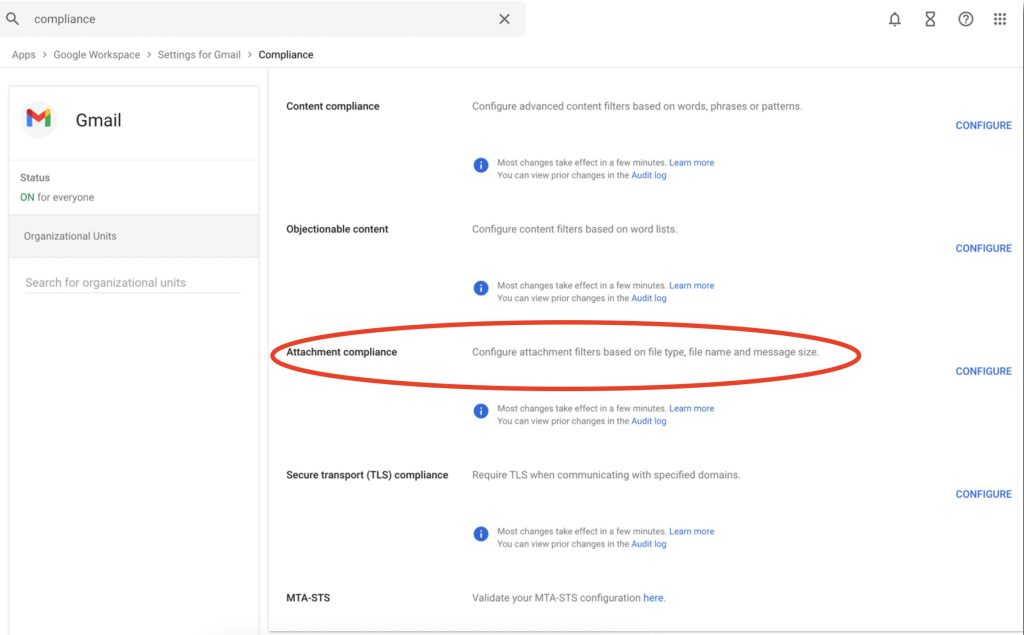
  1. Go to the Compliance page from the Admin Console.

    2. Next to Attachment compliance, click on Configure.

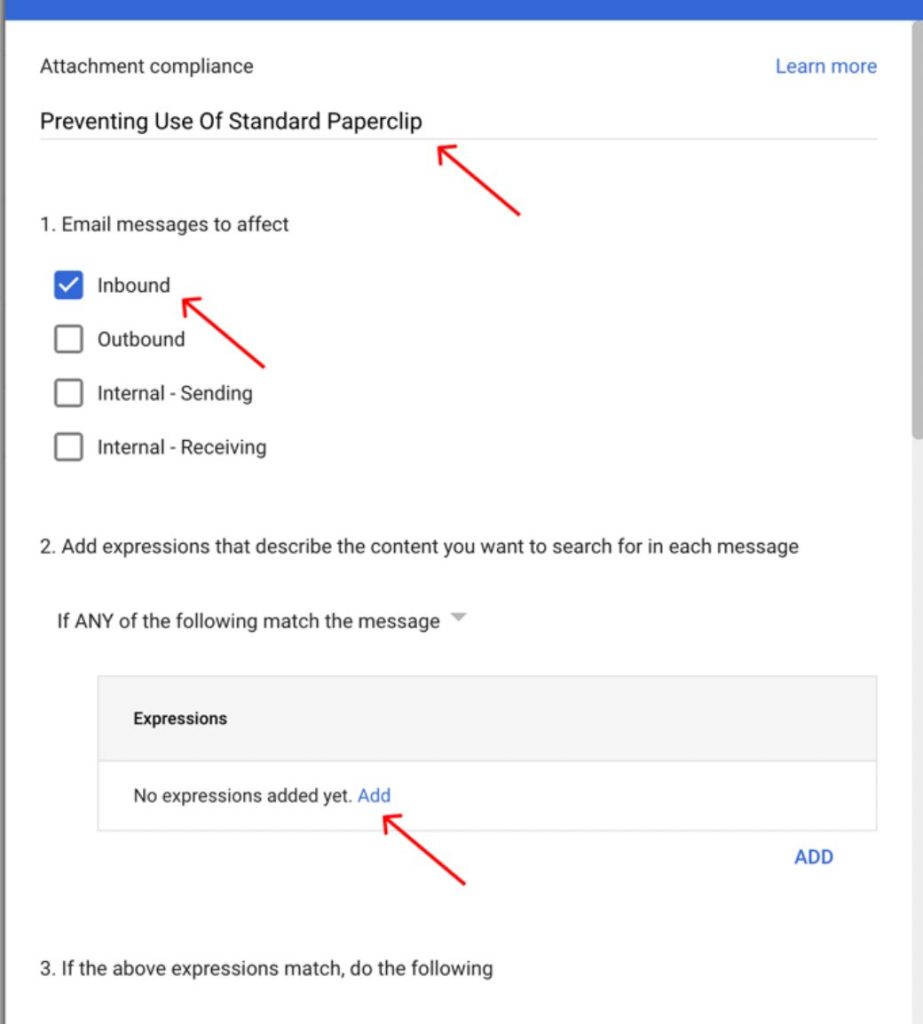
    3. Add a name to the rule. We recommend something short, such as Preventing Use Of Standard Paperclip.

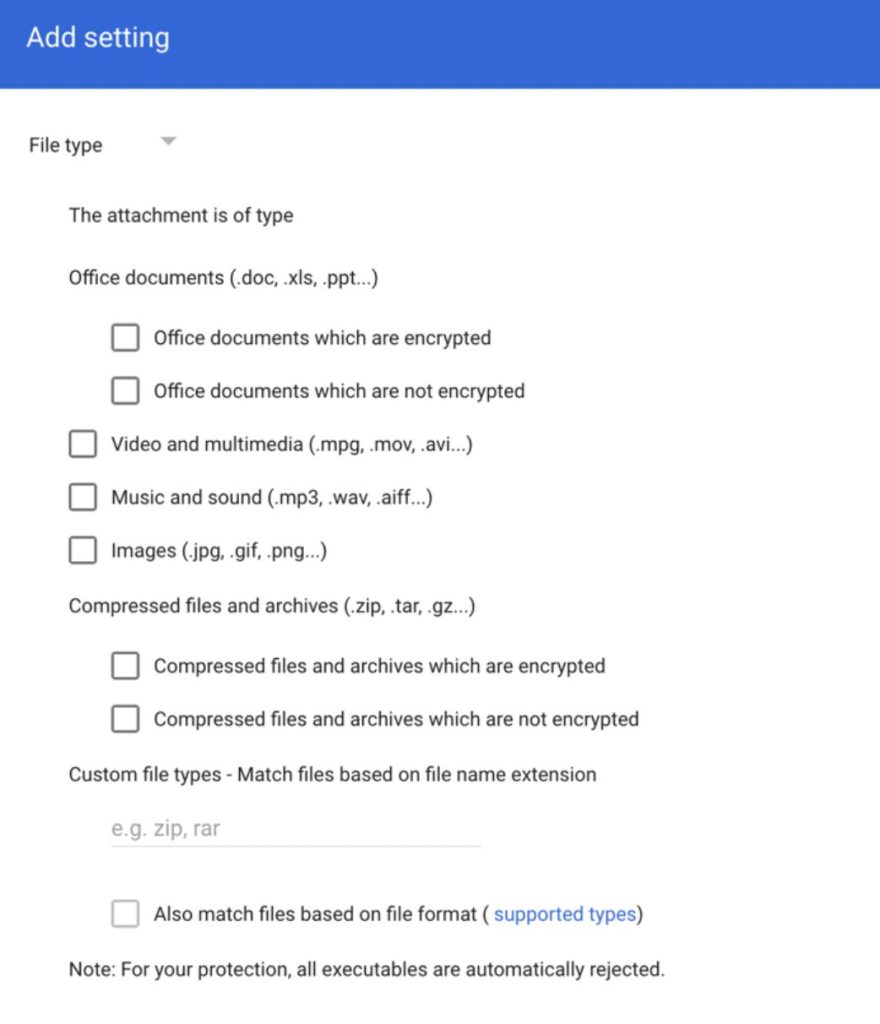
    4. Select the type of files

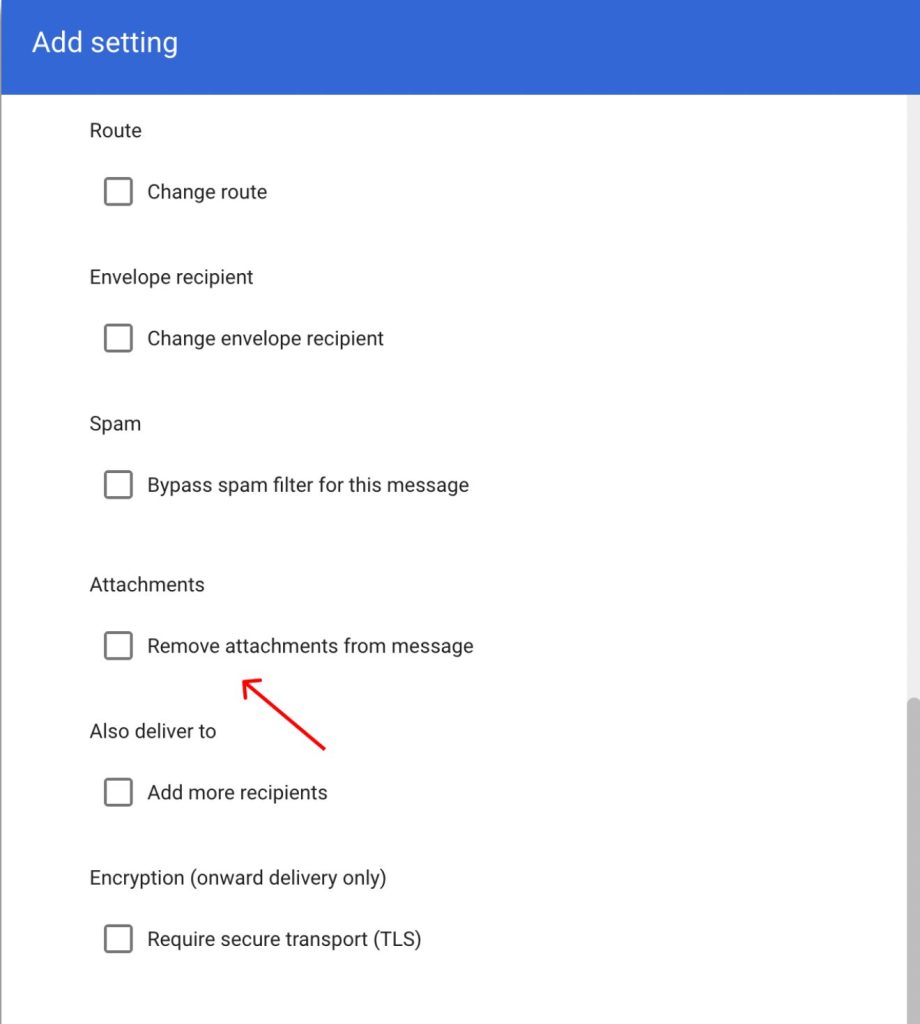
    5. Under “Attachments‘ click on Remove attachments from message.

    6. Press Save to finish the process.

    How to Disable The Standard Paperclip in Microsoft 365

    Have you replaced your vulnerable attachment paperclip yet? Everyday your organization waits to replace one of the biggest vulnerabilities facing companies today is another day you risk data loss and data breach. Here are the instructions for disabling the use of the old paperclip for email accounts within the Microsoft 365 ecosystem (go here for instructions on how to disable the attachment paperclip in Gmail). Note: Sending an attachment using OneDrive will bypass this configuration.

    You’ll see from the step-by-step instructions the person with access as the Office 365 admin needs to be the one to complete the process. They will be creating a new “rule” for the accounts in the system that will block attachments from being sent using the standard paperclip. 

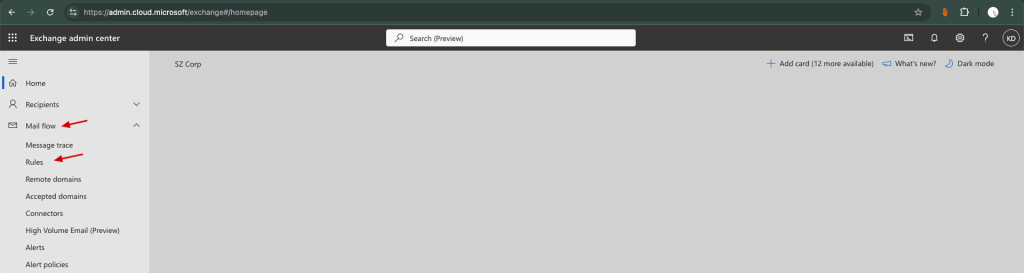
    1. Open the Exchange admin center (EAC) https://admin.exchange.microsoft.com on Outlook and sign in using your credentials. Note that this is only accessible by the Office 365 admin.
    2. On the left side, click the Mail flow dropdown, then Rules.

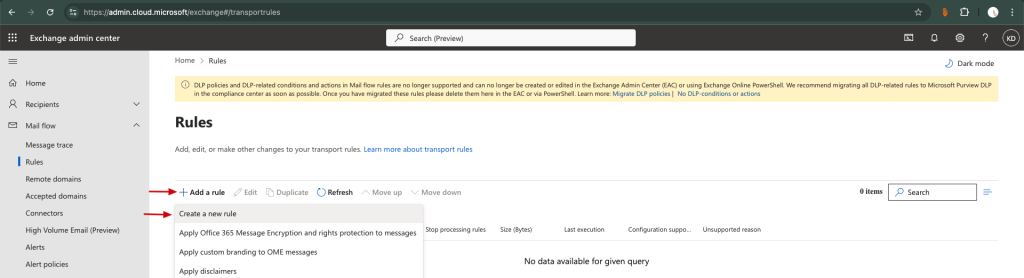
    3. Click Add a rule (Add Icon.) and then select Create a new rule.

    4. You will need to set the conditions under Set Rule conditions:

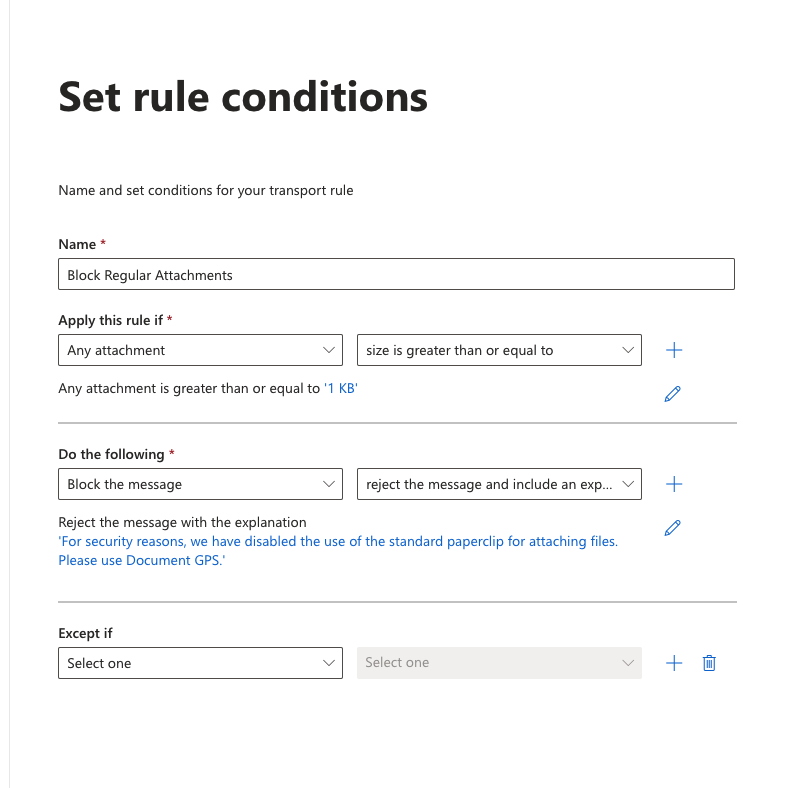
    • Name: Enter a unique, descriptive name for the rule. Example – Block Regular Attachments
    • Apply this rule if: this sets the conditions for when Microsoft will follow the rule. To disable all attachments being sent with the standard paperclip we recommend setting the rule to:
      • Any attachment
      • size is greater than or equal to 1 KB (where you specify attachment size limit)
    • Do the following:
      • Block the message
      • reject the message and include an explanation.
        1. Explanation example: For security reasons, we have disabled the use of the standard paperclip for attaching files. Please use Document GPS.
    • Hit Next
    • On the Set rule settings, hit Next. Review and Finish

    5. A success message will show: Transport rule created successfully. Hit Done. 

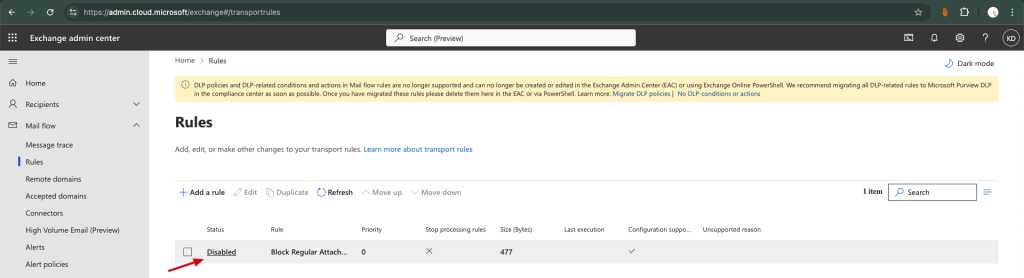
    6. **Once the rule has been created, initially the Status will be Disabled. To enable this, click on Disabled.Toggle it to Enabled.

    • A message will show up as Updating the rule status, please wait…
    • Then a success message will say Rule status updated successfully

    7. To verify if the rule has applied, go to Outlook Mail. Send an email to any recipient. You, the sender, should receive a bounced email stating that Your message to *email address* couldn’t be delivered.

      A screenshot of a email

Description automatically generated

      For more details, go to Common attachment blocking scenarios for mail flow rules in Exchange Online and Exchange admin center in Exchange Online.

        Marina Bay Sands data breach

        The alarming news about the Marina Bay Sands data breach marks the third chapter in a series off ransomware assaults that have besieged two high profile resort casinos: MGM Resorts and Caesar’s Entertainment. However, what transpired with Caesar’s Entertainment unveils the ominous reality—a staggering $15 million ransom paid in desperation to reclaim its compromised infrastructure. It’s a stark reminder that the consequences of a data breach are not confined to the digital realm; they spill over into the tangible, exacting a heavy toll that extends far beyond mere monetary figures. – https://lnkd.in/d7Etas8Z

        Now, as Marina Bay Sands faces the aftermath of its own digital tumult, there is a profound obligation to extend more than just a formal apology to its loyalty members. The breach is not an abstract concept but a breach of trust, resounding through the bonds meticulously built with their loyal community.

        Such breaches are no longer a question of whether they will happen but when they will happen. ShelterZoom has pioneered a groundbreaking cyberresilience solution, a user-friendly system that empowers all sectors to fortify themselves against cyberattacks, enabling secure information exchange impervious to hackers. In the unfortunate event of a breach, our game-changing solution springs into action, ensuring seamless business continuity. Brace yourself for a transformative era of cybersecurity.

        Learn more – https://phoenix-staging.shelterzoom.com/

        No Privacy

        Privacy is becoming harder and harder to come by in the digital era, but with Document GPS you can send messages privately without leaving your email account. Here’s how easy it is.

        Download today from these stores:

        Microsoft AppSource:
        https://lnkd.in/dnR5habT

        App Store:
        https://lnkd.in/gtwKsMus

        Chrome Store:
        https://lnkd.in/ePS-3T6j

        Google Play Store
        https://lnkd.in/ekimncqS

        Want to learn more? Book a quick demo with us here:
        https://lnkd.in/eP4VURYS

        Fight Against Rental Fraud

        Document GPS is a way to fight against #fraud, especially in the #realestate and #rental market. As #rentalfraud reaches more sophisticated methods, use a trusted method like our blockchain-based system for transferring files and ID documents so you don’t become a victim.

        https://lnkd.in/eQJKyJGF

        Find out all about it here or download today from any of the stores below
        https://lnkd.in/d2bYGU5Q

        Microsoft AppSource:
        https://lnkd.in/dnR5habT

        App Store:
        https://lnkd.in/gtwKsMus

        Chrome Store:
        https://lnkd.in/ePS-3T6j

        Google Play Store
        https://lnkd.in/ekimncqS